Can I forward SMS messages to a WhatsApp group?
Yes.
AutoForwardText can forward incoming SMS messages from your Android device to a WhatsApp group using a connected WhatsApp account.
This is useful when multiple people need to see SMS alerts, OTP messages, booking notifications, lead alerts, delivery updates, or other important text messages in one shared WhatsApp group.
Requirements
Before you can forward SMS messages to a WhatsApp group, you need:
-
An Android device connected to AutoForwardText
-
SMS forwarding enabled on the device
-
A WhatsApp account connected in AutoForwardText
-
The connected WhatsApp account must already be a member of the WhatsApp group
AutoForwardText cannot send messages to a WhatsApp group unless the connected WhatsApp account is already inside that group.
How to forward SMS messages to a WhatsApp group
-
Log in to your AutoForwardText dashboard.
-
Open Forwarding Rules.
-
Select the Android device you want to create the rule for.
-
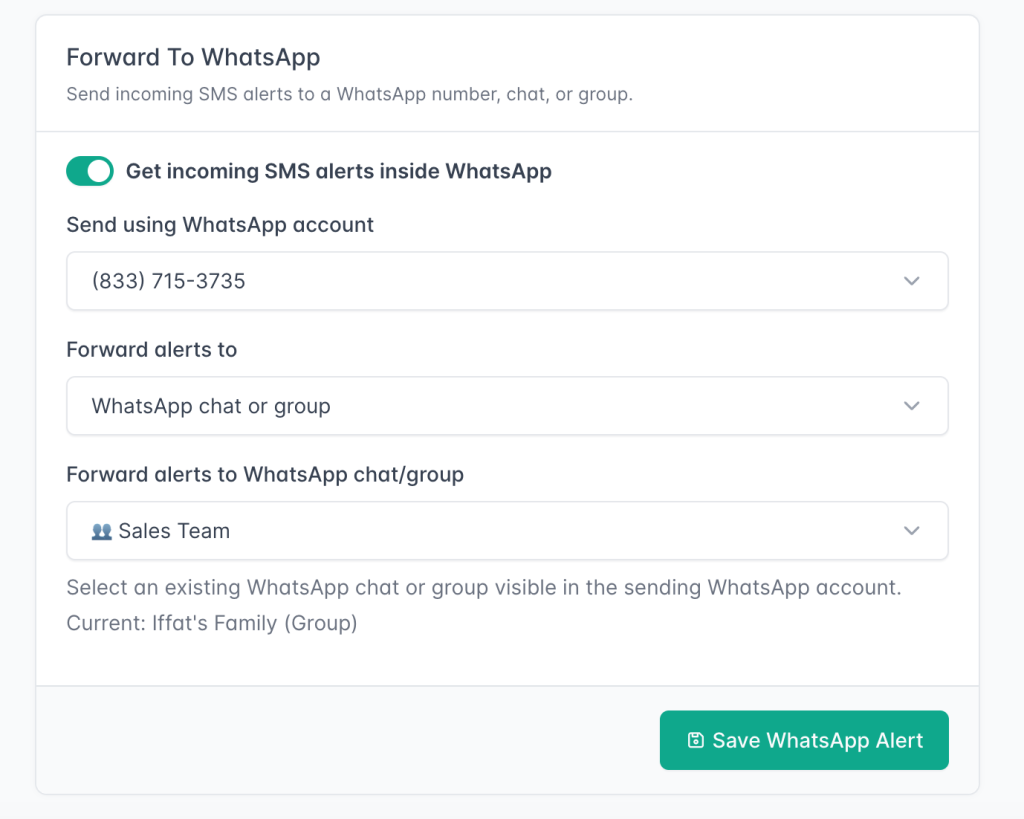
Go to the Forward To WhatsApp section.
-
Enable WhatsApp forwarding.
-
Select the connected WhatsApp account that should send the forwarded SMS messages.
-
Choose WhatsApp chat or group as the destination type.
-
Select the WhatsApp group from the dropdown list.
-
Save the forwarding rule.
After this, incoming SMS messages received on the selected Android device will be forwarded to the selected WhatsApp group.
What will the forwarded message look like?
The forwarded message includes the SMS sender, time, and message content.
Example:
New SMS received
From: John Smith (+14155552671)
Time: 2026-07-09 14:30:21
Message:
Your appointment is confirmed for tomorrow at 10:00 AM.
Why is my WhatsApp group not showing?
If your WhatsApp group does not appear in the dropdown, check the following:
-
The connected WhatsApp account is already a member of that group.
-
The WhatsApp account is connected and active in AutoForwardText.
-
The group has recent activity or is visible in the connected WhatsApp account.
-
Refresh the page and try again.
If the group still does not appear, send or receive a message in that WhatsApp group from the connected WhatsApp account, then refresh the AutoForwardText dashboard.
Can I forward SMS messages to both a WhatsApp number and a WhatsApp group?
A forwarding rule can be configured for one WhatsApp destination at a time.
You can choose either:
-
A WhatsApp number
-
A WhatsApp chat or group
If you need multiple destinations, you may create additional forwarding rules or use other forwarding options such as email, Slack, webhook, or another phone, depending on your plan and setup.
Can WhatsApp group replies be sent back as SMS?
No.
Replies received in the WhatsApp group are not automatically sent back as SMS.
This feature is designed for forwarding incoming SMS messages into WhatsApp for visibility and team notifications. It does not create a two-way SMS-to-WhatsApp group conversation.
Common use cases
Forwarding SMS to a WhatsApp group is useful for:
-
Sharing OTP or MFA codes with an operations team
-
Sending customer SMS inquiries to a support group
-
Forwarding booking or appointment alerts to staff
-
Sharing delivery or order notifications with a team
-
Sending lead alerts to a sales WhatsApp group
-
Keeping multiple team members informed without sharing the physical phone
Important note
The WhatsApp account connected to AutoForwardText is the account that sends the forwarded SMS messages into the group.
Make sure this account is allowed to post in the group and remains connected. If the WhatsApp account disconnects, SMS messages will stop forwarding to the WhatsApp group until the account is reconnected.