Forward WhatsApp Group Messages to SMS
AutoForward Text can automatically forward incoming messages from a specific WhatsApp group to one or more regular mobile phone numbers by SMS.
This is useful when recipients need updates from a WhatsApp group but do not use WhatsApp, have limited internet access, or prefer receiving important messages as text messages.
Before you begin
You need:
-
At least one WhatsApp group available on that account
-
An SMS sending method:
-
AFT Shared Number
-
Twilio number
-
Android SMS gateway device
-
-
At least one destination phone number in international E.164 format, such as
+14155552671
Sending SMS may use credits or incur provider charges depending on the selected sending method. Each destination number is treated as a separate SMS delivery.
Configure WhatsApp group-to-SMS forwarding
-
Sign in to your AutoForward Text dashboard.
-
Select WhatsApp Accounts from the left menu.
-
Under Connected Accounts, select the WhatsApp account that receives messages from the group.
-
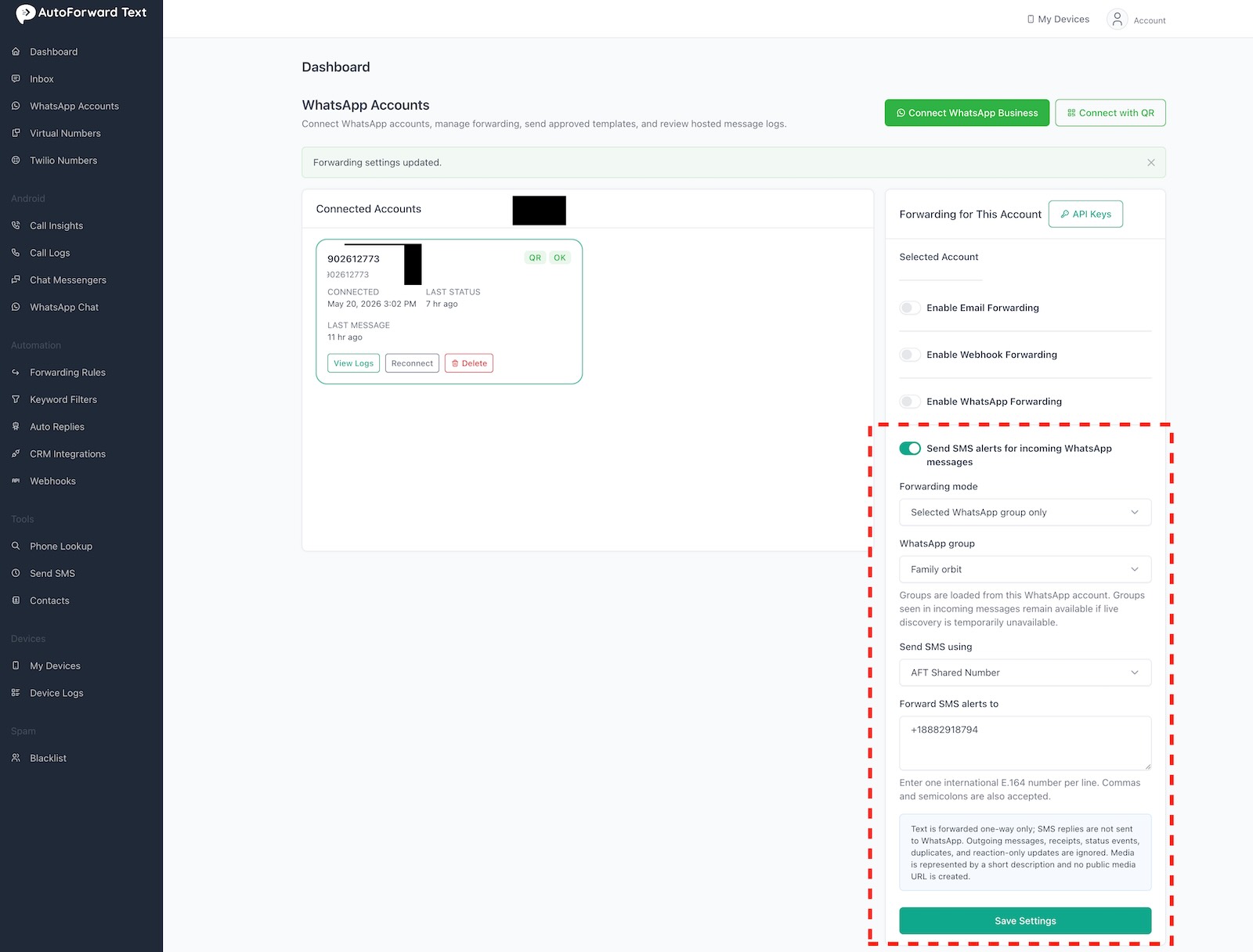
In Forwarding for This Account, enable Send SMS alerts for incoming WhatsApp messages.
-
Under Forwarding mode, select Selected WhatsApp group only.
-
Under WhatsApp group, select the group whose messages you want to forward.
-
Under Send SMS using, choose an SMS sending method:
-
AFT Shared Number: Send through an eligible AFT-managed number on your account.
-
Twilio number: Send through one of your configured Twilio numbers.
-
Android SMS gateway device: Send through an eligible connected Android device.
-
-
Select the sending number or gateway device when prompted.
-
Under Forward SMS alerts to, enter the mobile numbers that should receive the messages.
-
Select Save Settings.
Enter destination numbers in full international format. To add multiple recipients, place one number on each line. Commas and semicolons may also be accepted.
Example:
+14155552671+18882918794
What recipients receive
When a new message arrives in the selected WhatsApp group, AutoForward Text sends an SMS containing the group, sender, and message where that information is available.
Example:
Family Group — Sarah: Dinner is at 7 tonight.
Messages from other WhatsApp groups and direct conversations are not forwarded while Selected WhatsApp group only is active.
Forward all incoming WhatsApp messages
To forward eligible messages from every conversation instead:
-
Open the account’s forwarding settings.
-
Change Forwarding mode to All incoming WhatsApp messages.
-
Save the settings.
Use this option carefully because active accounts may generate a large number of SMS messages and associated charges.
Important limitations
WhatsApp-to-SMS forwarding is one-way:
-
Replies to the SMS are not posted back to WhatsApp.
-
Outgoing WhatsApp messages are ignored.
-
Delivery receipts, status events, duplicates, and reaction-only updates are ignored.
-
Supported text is forwarded as an SMS alert.
-
Media may be represented by a short description, such as
[Image received]. -
AutoForward Text does not create a public link to private WhatsApp media.
-
Long content may be split into multiple SMS segments by the mobile carrier or provider.
-
Existing keyword-filter rules may prevent matching messages from being forwarded.
Provider acceptance does not necessarily confirm final delivery by the recipient’s mobile carrier.
If your WhatsApp group is not listed
Groups are loaded from the selected WhatsApp account. If live group discovery is temporarily unavailable, groups detected in recent incoming messages may remain available.
Try the following:
-
Confirm that you selected the correct WhatsApp account.
-
Confirm that the account is still connected.
-
Send a new message to the desired WhatsApp group.
-
Refresh the WhatsApp Accounts page.
-
Open the group selector again.
If the group remains unavailable, reconnect the WhatsApp account or contact AutoForward Text support.
If messages are not being forwarded
Check the following:
-
SMS alert forwarding is enabled.
-
Selected WhatsApp group only is selected.
-
The correct group is selected.
-
The settings were saved successfully.
-
Every destination uses international format, including the
+and country code. -
The selected AFT Shared Number, Twilio number, or Android gateway device is active and able to send SMS.
-
Your account has sufficient SMS credits or provider balance.
-
Existing keyword filters are not excluding the message.
-
The incoming item is a supported message rather than a receipt, status event, duplicate, or reaction-only14.
-
The scheduled SMS service is running if your sending method uses queued delivery.
The Message Logs section can help identify whether a message was forwarded, filtered, ignored, or failed.
Privacy reminder
Forwarded SMS messages leave WhatsApp and are delivered through an SMS provider or Android gateway. Make sure group participants understand that their messages may be forwarded outside the group, and only forward messages to authorized recipients.